





Size calculator for your shop
0,00€ IVA Incluido
A free WordPress plugin. Your customer measures once, presses a button, and knows which size to order from your chart. No generic tables to read across with a finger, no emails asking, no returns because the size was a guess.
You write your size charts in the WordPress dashboard: the measurements you ask for, and the range each size covers. One chart per pattern, because leotards, sets and velvet do not size the same way
What it does
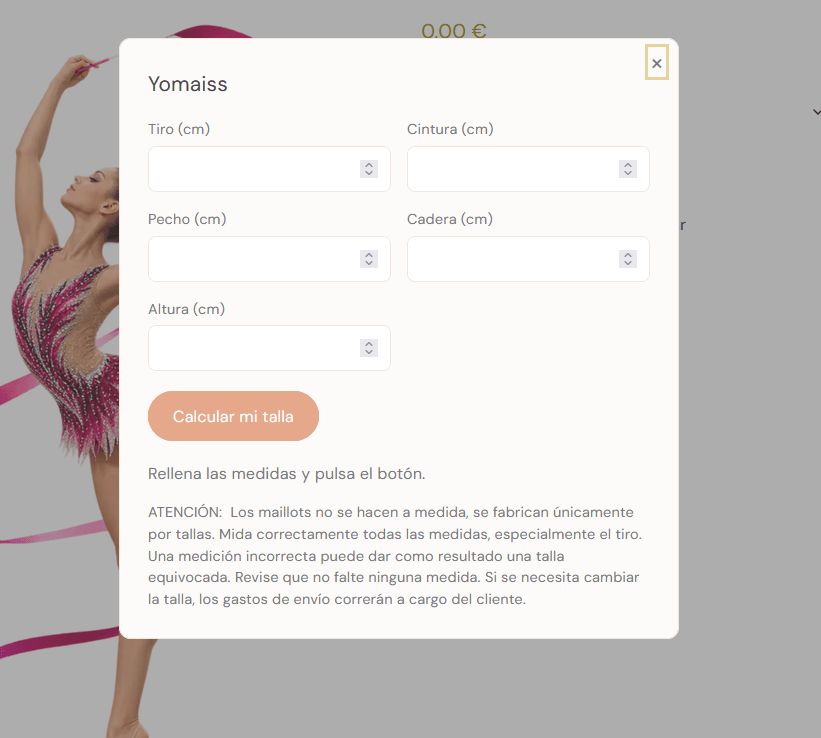
- It names the size, it does not hint at it. The customer enters their measurements and gets their size straight away, in a window that opens without loading the page again..
- It fills in the size dropdown. If the page already has one, 13Sizer selects it for the customer. On a WooCommerce product that means the variation and the price follow on their own.
- It is honest when the numbers disagree. When the chest says one size and the waist says another, it says so: it gives the closest size, names the runners up and invites the customer to write to you, instead of guessing quietly.
- It remembers. On the next visit the button no longer reads “Calculate my size” but “Your size: 10 · recalculate”.
- One shortcode and you are done.
[trecesizer chart="maillots"]on any page, post or product.
Free, and free for real
13Sizer has no paid tier, no license key and no features hidden behind a gate. It contacts no server of ours either: install it, use it, and it stays on your site. Updates come from WordPress.org like those of any other plugin.
With WooCommerce or without it
It works the same in a shop as on a site with no cart: it answers one question — which size — and hands the answer to whoever asked. And if you also run 13Atelier, our product configurator, 13Sizer takes over its size step: the customer picks a size from cards, or presses “I don’t know my size” and works it out right there. Size and measurements both travel to the order, so whoever cuts the pattern has the numbers in front of them.
Neither plugin needs the other to work.
Up and running in three steps
- Create a size chart: the measurements you ask for, and one range per size.
- Paste the shortcode where the button should go, or assign the chart to a 13Atelier size step.
- That’s it.
Related products